
You Just Paid ₹500 With UPI. What Happened Behind the Scenes?
AI Summary
Get a quick overview of the key points
Tap Generate Magic to let AI read for you.
You scan a QR code, enter ₹500, enter your UPI PIN, and within a few seconds you see:
Payment Successful
It feels almost like the money simply jumped from your bank account to someone else's phone.
But that's not what actually happens.
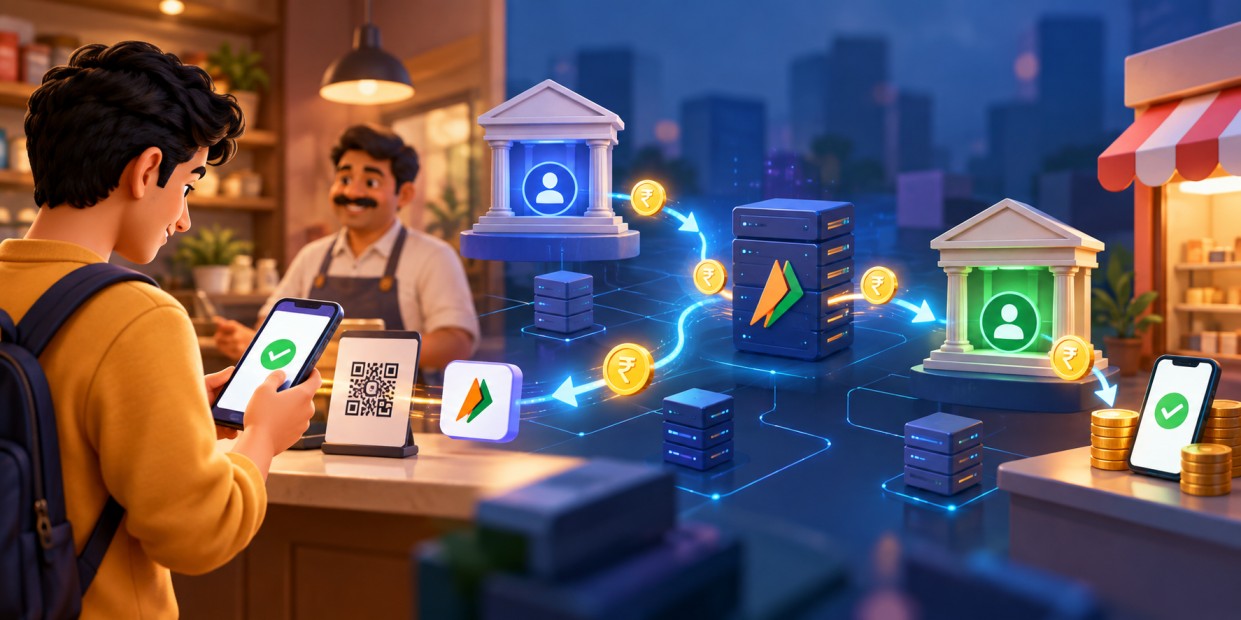
Behind that simple Pay button, your UPI app, payment providers, banks, and UPI infrastructure work together to complete the transaction.
Let's see what actually happens.
What Is UPI?
UPI (Unified Payments Interface) is a payment system developed by the National Payments Corporation of India (NPCI). It allows people to make payments directly between participating bank accounts using a UPI-enabled app.
Instead of entering a bank account number and IFSC code every time, you can use:
- UPI ID
- QR code
- Mobile number
- Other supported payment methods
For example:
text1sahil@bank
The important thing to understand is that UPI is not a bank and does not hold your money. Your money remains in your bank account. UPI provides the infrastructure that helps payment providers and banks process and route UPI transactions.
What Happens When You Tap "Pay"?
Imagine you're buying something for ₹500.
You scan the shop's QR code. Your UPI app reads the payment information and may show something like:
text1Merchant: ABC Store
2UPI ID: abcstore@bank
3Amount: ₹500
You confirm the details and enter your UPI PIN.
Your phone isn't simply sending ₹500 to the shop. Your app is starting a payment request.
A simplified view looks like this:
tsx1             ₹500 UPI PAYMENT
2
3                    You
4                     │
5                     ▼
6              📱 UPI App
7                     │
8                     ▼
9             UPI / NPCI System
10                ↙           ↘
11               ↓             ↓
12        🏦 Your Bank     🏦 Receiver's Bank
13               │             │
14               ▼             ▼
15             Debit          Credit
16               │             │
17               └──────┬──────┘
18                      ▼
19             Payment Successful
The real system has more steps and checks, but this gives you a good idea of how the different parts work together.
How Is the Payment Authorized?
Your bank needs to make sure that you are actually allowed to make the payment.
Your UPI PIN is an important part of this process.
The system performs checks such as:
- Is the account valid?
- Is the payment properly authenticated?
- Are sufficient funds available?
- Do the required security and risk checks pass?
If everything is fine, the transaction can continue.
If something goes wrong, you might see:
text1Insufficient balance
2Transaction declined
3Technical error
4Transaction failed
Your UPI PIN should never be shared with anyone. A merchant does not need your UPI PIN to receive a payment.
Where Does NPCI Come In?
Once you authorize the payment, UPI coordinates the transaction between the relevant payment providers and banks.
A simplified flow is:
text1You
2 ↓
3UPI App / Payment Provider
4 ↓
5UPI / NPCI
6 ↙          ↘
7Your Bank    Receiver's Bank
8 ↓                ↓
9Debit            Credit
Your bank processes the debit from your account, while the receiver's bank processes the credit to the receiver's account.
NPCI's UPI infrastructure helps coordinate and route these transactions between participating members.
There is also a separate inter-bank settlement process behind the scenes. In simple terms, the customer can see the payment completed in real time, while the corresponding settlement between participating banks is handled separately through NPCI's settlement system.
Does the Money Actually Travel Through the Internet?
Not in the way a photo or file travels from one phone to another.
Your phone isn't sending a digital ₹500 file to the receiver.
Instead, the participating financial systems process the transaction and update the relevant account records.
For example, before the payment:
text1Your account:    ₹5,000
2Shop's account:  ₹2,000
After a successful ₹500 payment:
text1Your account:    ₹4,500
2Shop's account:  ₹2,500
So it is better to think of UPI as transferring value between bank accounts, rather than physically moving digital cash between phones.
What Does the QR Code Actually Do?
A UPI QR code makes it easier to provide payment information.
When you scan it, your app can read information such as the merchant's UPI address and other payment parameters.
The process looks like:
text1QR Code
2   ↓
3Payment information
4   ↓
5UPI App
6   ↓
7Payment request
The QR code itself isn't storing ₹500 and it isn't transferring money.
It simply helps your app know who you are paying and how to start the payment.
That's why you should always check the receiver's details shown by your app before confirming the payment.
Why Is UPI So Fast?
Several things work together to make UPI payments feel almost instant.
The payment is processed digitally, participating banks and payment providers communicate through standardized systems, many checks are automated, and UPI IDs and QR codes make it unnecessary to enter long bank details every time.
From your point of view, the process is very simple:
text1Scan QR
2   ↓
3Enter amount
4   ↓
5Enter PIN
6   ↓
7Payment processed
8   ↓
9Success
Behind those few seconds, several systems may be communicating with each other.
What If You Send Money to the Wrong Person?
This is one of the most important things to remember.
A successful UPI payment generally cannot simply be cancelled by pressing an undo button.
That's why you should check:
- Receiver's name
- UPI ID
- Amount
before entering your UPI PIN.
If you accidentally send money to the wrong person, you normally need to contact your bank and follow the applicable dispute or recovery process.
What If the Payment Fails?
Sometimes your bank, the receiver's bank, your network connection, or another part of the payment system may have a temporary problem.
You might see:
text1Processing...
or:
text1Payment Failed
A particularly confusing situation is when your account is debited but the receiver doesn't immediately receive the money.
This does not automatically mean that the money is lost. The transaction may need to be reconciled between the participating systems, and the final status may take some time to settle.
If this happens, check the transaction status in your UPI app and contact your bank if necessary.
UPI vs Your Bank vs Your UPI App
These three things are easy to confuse.
Your bank holds your bank account and your money.
Your UPI app or payment provider gives you the interface through which you start the payment.
UPI provides the payment infrastructure that allows participating banks and payment providers to process and route UPI transactions.
So when you pay through a UPI app, the app isn't necessarily the company holding your money.
A simplified picture is:
text1                 UPI App
2                    │
3                    ↓
4                UPI System
5               ↙          ↘
6        Your Bank      Receiver's Bank
7            ↓                ↓
8      Your Account      Receiver's Account
The Complete Journey
Let's put everything together.
Suppose you pay ₹500 to a shop.
text11. You scan the QR code
2          ↓
32. Your app reads the payment information
4          ↓
53. You enter or confirm ₹500
6          ↓
74. You enter your UPI PIN
8          ↓
95. The payment is authenticated
10          ↓
116. UPI coordinates the transaction
12          ↓
137. Your bank processes the debit
14          ↓
158. The receiver's bank processes the credit
16          ↓
179. Transaction status is returned
18          ↓
1910. You see "Payment Successful"
The entire customer-facing process may take only a few seconds.
Final Thoughts
The next time you scan a QR code and pay ₹100, remember that your phone isn't directly sending ₹100 to another phone.
The QR code provides payment information. Your UPI app starts the transaction. Your payment provider and UPI infrastructure coordinate the request. Your bank processes the debit, and the receiver's bank processes the credit.
What looks like:
Scan → Pay → Done
is actually several financial systems working together behind the scenes.
And that's what makes UPI so powerful: it hides a complicated payment infrastructure behind an extremely simple user experience.