
JWT Explained: How JSON Web Tokens Work in Authentication
AI Summary
Get a quick overview of the key points
Tap Generate Magic to let AI read for you.
If you are learning backend development with Node.js and Express, JWT is one of the concepts you should understand before building secure APIs.
JWT is commonly used in web applications to handle authentication. It helps servers verify information about a user and decide whether a request should be allowed.
But what exactly is JWT? How does it work? Is it encrypted? And what happens when a token expires?
Let's understand JWT step by step, using simple explanations and practical examples.
1. What Is JWT?
JWT stands for JSON Web Token.
It is an open standard defined in RFC 7519 for representing information as a set of claims in a compact format.
In web development, JWTs are commonly used in authentication systems.
Imagine a user logs into your application with an email and password. After verifying the credentials, your server can issue a JWT. The client can then send this token with requests to protected API endpoints.
The server verifies the token and checks whether the user is allowed to access the requested resource.
For example, a JWT might carry information such as:
- The user's ID.
- The token's expiration time.
- The token issuer.
- The user's intended role, if appropriate.
JWT is a token format, not a complete authentication system. Your application must still handle login, token verification, permissions, expiration, and other security requirements.
2. Why Do Developers Use JWT?
Consider a web application with a React frontend and a Node.js backend.
After logging in, a user wants to view their profile, update their settings, or access other protected resources.
The server needs a reliable way to determine who is making each request.
JWT can help by allowing the server to verify a signed token sent with the request.
Common benefits include:
- Compact format: Tokens can be sent through HTTP headers.
- Standardized structure: Claims have commonly understood meanings.
- Distributed verification: Multiple services can verify tokens when they share the appropriate verification keys and trust the same issuer.
- Flexible use: JWTs can carry information about identity, token lifetime, and other claims.
However, JWT is not always the best choice. Traditional server-side sessions can be simpler when an application needs straightforward session management and revocation.
The right approach depends on the application's requirements.
3. Understanding the Structure of a JWT
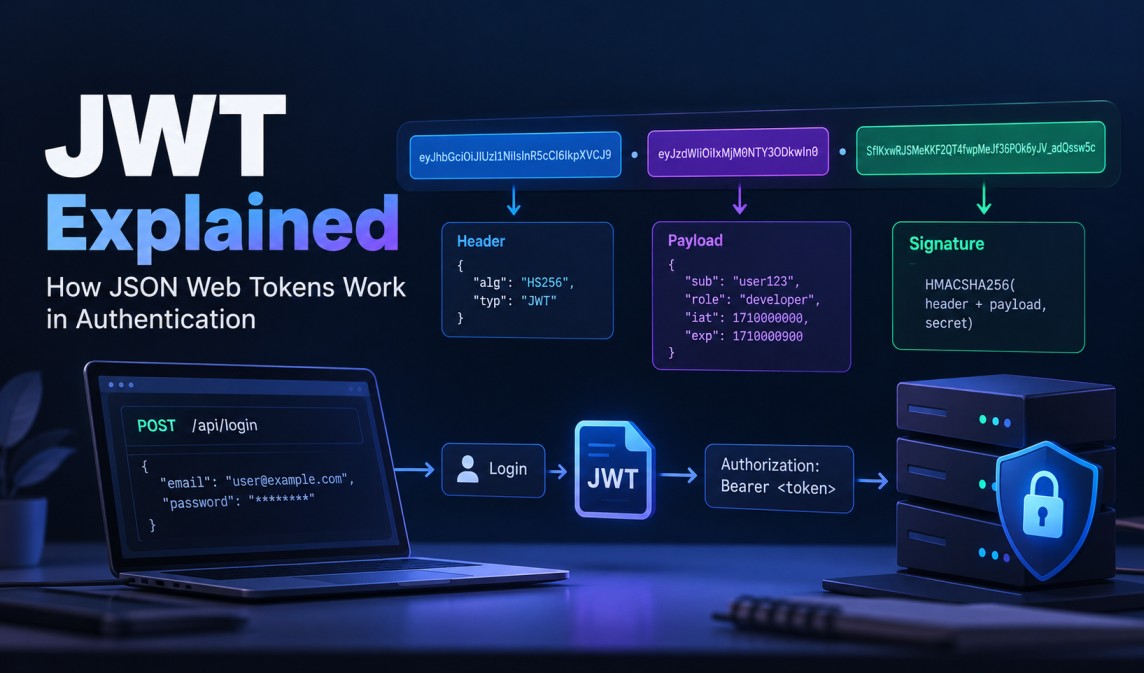
A typical signed JWT looks like this:
text1xxxxx.yyyyy.zzzzz
It contains three parts separated by dots:
text1HEADER.PAYLOAD.SIGNATURE
Let's understand each part.
A. Header
The header contains metadata about the token, such as its type and signing algorithm.
Example:
json1{
2  "alg": "HS256",
3  "typ": "JWT"
4}
Here:
algidentifies the signing algorithm.typindicates the token type.
HS256 is an HMAC-based signing algorithm that uses SHA-256.
B. Payload
The payload contains claims, which are statements about the subject or token.
Example:
json1{
2  "sub": "user123",
3  "role": "developer",
4  "iat": 1790000000,
5  "exp": 1790000900
6}
Some important fields are:
| Claim | Meaning |
|---|---|
sub | Subject, often the user's ID |
iat | Time the token was issued |
exp | Time the token expires |
iss | Issuer of the token |
aud | Intended audience |
These fields are examples; not every JWT must contain all of them.
Important: In a typical signed JWT, the header and payload are Base64URL-encoded, not encrypted. Anyone who obtains the token can generally decode and read them.
Never store passwords, API secrets, or other confidential information in an ordinary signed JWT payload.
C. Signature
The signature helps the server detect whether the signed token has been modified.
For an HMAC-signed JWT, the signing process uses the encoded header, encoded payload, and a secret key.
Conceptually:
text1signature = HMAC(
2  secret,
3  encodedHeader + "." + encodedPayload
4)
If someone changes the payload without producing a valid signature, verification fails.
The server must verify the signature using a trusted key and an explicitly permitted algorithm.
One more distinction matters: JWT also supports encrypted tokens through JSON Web Encryption (JWE). Therefore, not every possible JWT is simply a signed, readable token. The common three-part format discussed here is a signed JWT.
4. How Does JWT Authentication Work?
- Login: The user submits credentials.
- Verification: The server validates them and issues a signed JWT.
- Request: The client sends the token with protected API requests.
- Validation: The server verifies the token's signature and expiration.
- Authorization: The server checks permissions and grants or denies access.
text1Login → Verify Credentials → Issue JWT
2  → Send Token → Verify JWT → Grant/Deny Access
The client typically sends the token using this HTTP header:
http1Authorization: Bearer <your-access-token>
Remember: A valid JWT does not automatically grant access to every resource. The server must still check permissions.
5. JWT vs Session-Based Authentication
JWT and session-based authentication are two common approaches, but they manage authentication state differently.
| Feature | JWT-based approach | Session-based approach |
|---|---|---|
| Client typically sends | A token | A session cookie |
| Authentication state | Can be verified from the token | Usually stored on the server |
| Revocation | May require additional mechanisms | Often straightforward by invalidating the session |
| Distributed systems | Can simplify token verification across services | May need shared session storage |
| Security concerns | Token theft, key management, claim validation | Session theft, cookie security, CSRF |
Neither approach is universally better.
JWT can be useful when multiple services need to verify access tokens. Server-side sessions can be a good choice when centralized session control and revocation are important.
Also, JWT does not automatically make an application stateless. A system may still store refresh-token records, revoked-token identifiers, or other session information.
6. How to Implement JWT in Node.js
Let's implement a small example using Express and the jsonwebtoken package.
This example demonstrates token creation and verification. It assumes that the user has already been authenticated successfully.
Step 1: Install the packages
bash1npm install express jsonwebtoken dotenv
Create a .env file:
env1JWT_SECRET=replace_with_a_long_random_secret
Generate a strong secret for your local environment, and never commit the real .env file to Git.
Step 2: Create an access token
javascript1const jwt = require("jsonwebtoken");
2
3function createAccessToken(user) {
4  return jwt.sign(
5    { role: user.role },
6    process.env.JWT_SECRET,
7    {
8      subject: String(user.id),
9      expiresIn: "15m",
10      algorithm: "HS256"
11    }
12  );
13}
This function creates a signed token containing the user's ID as the subject, their role, and an expiration time.
The 15m setting means the token expires after 15 minutes.
In a real application, issue the token only after successfully verifying the user's credentials.
Step 3: Verify the token using middleware
javascript1const jwt = require("jsonwebtoken");
2
3function authenticateToken(req, res, next) {
4  const authHeader = req.headers.authorization;
5
6  const token = authHeader?.startsWith("Bearer ")
7    ? authHeader.slice(7)
8    : null;
9
10  if (!token) {
11    return res.status(401).json({
12      message: "Authentication required"
13    });
14  }
15
16  try {
17    req.user = jwt.verify(
18      token,
19      process.env.JWT_SECRET,
20      { algorithms: ["HS256"] }
21    );
22
23    next();
24  } catch {
25    return res.status(401).json({
26      message: "Invalid or expired token"
27    });
28  }
29}
This middleware extracts the token from the Authorization header, verifies it, and makes its verified claims available through req.user.
For a production system, you should also validate relevant claims such as issuer and audience, and handle authorization separately.
Step 4: Protect a route
javascript1app.get("/profile", authenticateToken, (req, res) => {
2  res.json({
3    user: req.user
4  });
5});
Requests to /profile must now include a valid access token.
This is a basic demonstration, not a complete production authentication system. A real application also needs login validation, secure token storage, authorization checks, and an appropriate expiration and revocation strategy.
For the complete implementation of access tokens, refresh tokens, rotation, and logout, read our separate tutorial:
Secure Node.js API with JWT Authentication & Refresh Tokens
7. Common JWT Security Mistakes
JWT is useful, but mistakes in its implementation can create serious vulnerabilities.
1. Storing sensitive information in the payload
A typical signed JWT payload is readable. Do not include passwords or confidential information that the token holder must not see.
2. Using weak signing secrets
A weak secret may allow an attacker to guess the key and create forged tokens. Use strong secrets and store them securely.
3. Accepting unexpected algorithms
The backend should explicitly restrict the algorithms it accepts and use the correct verification key.
4. Ignoring expiration
Access tokens should have an appropriate lifetime, and the server must validate expiration. Expiration limits how long a stolen token can be used, but does not prevent theft.
5. Storing tokens carelessly
Tokens stored in JavaScript-accessible storage can be stolen if an XSS vulnerability exists. HttpOnly cookies prevent JavaScript from directly reading the cookie, but cookie-based authentication also requires suitable CSRF protections.
6. Confusing authentication with authorization
Verifying a JWT tells the server that the token passed its validation checks. It does not mean the user can access every API endpoint or modify every record.
Always check permissions for the requested action and resource.
7. Forgetting revocation
A signed JWT may remain valid until expiration unless the application implements additional controls. Short-lived access tokens and properly managed refresh tokens can help limit the impact of a stolen token.
Conclusion
JWT is a widely used token format that helps applications exchange verifiable information about a user or session.
To understand it properly, remember three things:
- Header: Contains token metadata.
- Payload: Contains claims.
- Signature: Helps verify integrity and authenticity.
JWT is only one part of an authentication system. Secure applications must also validate tokens correctly, enforce permissions, protect credentials, manage expiration, and handle revocation.
If you're building a MERN application, try implementing a protected Express route and testing it with a valid, expired, and modified token. This practical exercise will help you understand how JWT verification works beyond the theory.
Coming next: 20 JWT Interview Questions and Answers for Developers — a separate guide to help you revise these concepts before a technical interview.